
This is not a mod, it’s about ATS console and how to use it.
American Truck Simulator free camera, teleport, change time and more console commands.
ATS console commands:
– First of all, you have to enable the console to use it
– You need to edit this file: \Documents\American Truck Simulator\config.cfg
– Open it with notepad and change these values from 0 to 1: uset g_developer “1” and uset g_flyspeed “300”
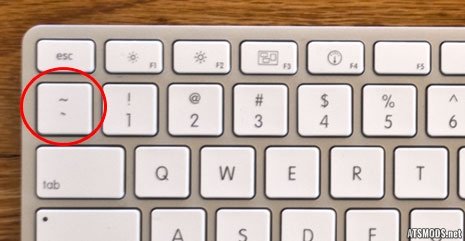
– After those changes, start the game and press tilde key to open the console
– Also now the free camera is enabled, activate it by pressing 0 key
– g_flyspeed [number] – Changes free camera speed. Example: g_flyspeed 200
– g_set_time [number] – Changes the time. Example: g_set_time 12
– g_traffic [0 or 1] – Enable or Disable Ai traffic
– g_goto [cityname] – Teleport to desired city. Example: goto vegas
– warp [number] – Changes world speed. Example: warp 1000. Default is 1.
– g_set_weather [number] [f or i] – Changes the weather. Example: g_set_weather 1 f
– g_minicon [1 or 0]
– g_fps [1 or 0]
There are a lot more console commands. Press Tab key in console to get the list.






this camera is always under the truck and i can’t move it at all 🙁
just move with num keys on left of the keyboard
when you find out that place you want to go
press F9 to drop your truck down 🙂